
Discover the power of After Effects overlays for video editing! Here are the top 20 preset packs on Envato Elements, and tips for customizing overlay presets.



Want to add depth, style, and creative flair to your videos with After Effects presets? In this article, we’ve rounded up some of the top After Effects overlay preset packs on Envato Elements – the ultimate creative subscription – and how to apply them to your video projects.
What are After Effects Overlays?
Overlay presets for After Effects are pre-designed effects to add something extra to your video footage. They’re just like templates, which means you can quickly and easily apply styles and effects and enhance your visuals without starting from scratch.
The Benefits Overlays in Video Editing
After Effects overlays offer several benefits. You can easily customize or tweak the pre-made templates to make them perfect for your video, and it’s much quicker than making something yourself. Plus, if you don’t know how to use After Effects, they can simplify your workflow.
There’s another benefit to After Effects overlay packs that people sometimes don’t consider, too: inspiration. If you don’t know where to start, a professionally made asset can give you a great jumping-off point for how you might style effects in your video.
Here are some more great reasons to give After Effects overlays a try:
- Time and cost-saving
- Quick and easy creative effects
- Visual continuity
- Enhanced storytelling
- Branding and identity
Top 20 After Effects Overlay Preset Packs
1. Stream Overlays Package


This blocky, funky After Effects overlay pack has a retro edge perfect for game streaming. You won’t need any plugins for this template, and it’s easy to use.

2. Christmas Lights Garland Overlays


‘Tis the season for awesome overlay packs for After Effects – with a Christmas theme! Add shimmering lights to your video production in a variety of styles. Try this After Effects template for Christmas greetings to friends, co-workers, or clients.

3. Overlay Title Transitions


This overlay pack for After Effects packs a punch. Drop the template onto your video, edit the text and colors, and you’re ready. You can use this After Effects overlay with photos, videos, or any other media type.

4. Light Leak Overlays


Add some drama to any film with this color overlay for After Effects. Light leak After Effects overlays that have been recorded in-camera for an entirely realistic look, and each option is available in 4K and lasts between 3 and 10 seconds.

5. Animated Shadow Overlay Set


Add realistic shadows in just a few clicks with this After Effects overlay pack. There are 19 to choose from, with each scene lasting 10 seconds.

6. 150+ Glitch FX & Overlays


This After Effects glitch overlay pack contains over 150 elements, including styles like VHS, dust, RGB, and more.

7. Retro VHS Overlay Pack


If you like your videos with a touch of nostalgia, then you’ll love this overlay for After Effects in VHS style. They’re available in 4K; you can use them on your vertical videos.

8. Instagram Profile Promo Overlay


Promote your Instagram account using this promo After Effects overlay. It’s perfect for products, portfolios, and fashion or travel video projects.

9. Abstract Backgrounds And Overlays for After Effects


Add fun to your video with these abstract backgrounds and overlays for After Effects. There are tons to choose from, so you can keep using them across all your films without them feeling repetitive.

10. Twitch Overlay Stream | After Effects


If you’re looking for an Adobe After Effects stream overlay, why not try this futuristic item? There are 6 to choose from, each in 4k resolution and with full-color control.

11. Premium Overlays Distortion


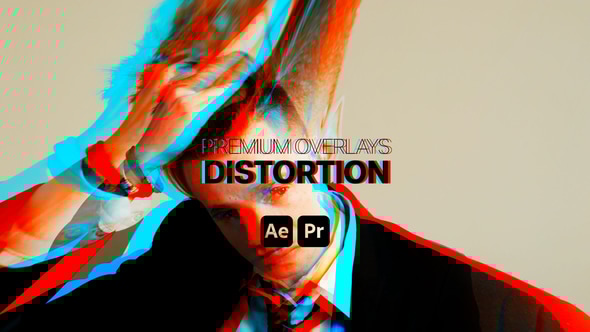
This is a fun distortion effect overlay for AE 2019 and above. You can also use this with Premiere Pro (2019+) and customize colors to suit your project.
12. Premium Overlays Dirty Lens


Add a bokeh effect with this dirty lens overlay for After Effects. You’ll need to use 2019 or above to use this template, but it’s also compatible with DaVinci Resolve, After Effects, and Apple Motion.

13. Stream Branding Package. Stream Overlays. Happy Easter Edition


Wish your viewers a happy Easter with this themed Adobe After Effects stream overlay sprinkled with fun Easter motifs like eggs and bunny ears. It includes webcam overlays, animated alerts, and much more. Try it with YouTube broadcasts.

14. Action Flash FX Overlays | After Effects


If your videos need a little drama, look no further than this item. This FX overlays pack for After Effects includes 33 anime, cartoon, flash, and action elements.

15. Magic FX Pack | After Effects


Want to add a magical touch to your next project? Add some sparkle quickly and easily with this pack of overlays for After Effects, made in 2D style with fun animations.

16. Animated Stickers Pack


No matter how old we get, stickers will always be a fun addition to any project! This After Effects overlay lets you add virtual stickers to your video projects, with over 70 to choose from – including useful shapes and speech bubbles.

17. Twenty Light Leak Effects Kit


Light leaks can give your video a lovely color overlay in After Effects. Add an analog twist to your next project with this light effects kit in gorgeous orange, yellow, and pink tones.

18. Fresh Transitions


This massive pack of overlay transitions is ready to use in just a few clicks. With over 800 choices, this pack will set you up for multiple projects.

19. The Particles


Particles are a popular video effect, adding artistic flair to any project. You could use this After Effects video overlay to transition between travel photos or add some glitz to a fashion project.

20. Liquid Transitions | After Effects


This pack of liquid overlays comes in various sizes, shapes, and animations. Add a funky color overlay in After Effects with this template in just a few clicks.

Tips for Customizing and Adjusting Overlay Presets for Your Video
1. Blend Overlays
Try blending After Effects overlays for a cool, artistic effect. You can often stack and combine more than one effect to create something new, so it’s worth learning how to blend two video overlays seamlessly in After Effects.
2. Change Overlay Colors
Changing the overlay colors to match your branding can quickly and easily make an After Effects overlay look like it was specially made for you.
3. Add Animation
The great thing about overlay templates is that you can customize them! Try adding your own animations or tweaking the template’s existing ones to make something unique.
How to Use After Effects Overlays: FAQs
1. How to Download and Install Overlay Presets in After Effects
- Find and download some overlay presets for After Effects
- Extract your preset files
- In After Effects, go to File > Preferences and Presets and navigate to where your presets are saved.
2. How to Add Presets to a Video in After Effects
You can add presets to a video in After Effects by using the Effects & Presets panel in the software and choosing Browse Presets. In many cases, once you’ve extracted your files from the download, you can add them by dragging and dropping them onto the timeline.
3. How to Blend Two Video Overlays Seamlessly in After Effects
Using blending modes and adjusting the opacity (transparency) on your layers, you can blend more than one video overlay in After Effects, creating an entirely new effect. If you like it, you can save the result to use again.
4. How to Adjust Opacity and Color for Desired Effect
You’ll find the Opacity option for the selected overlay in the Effect Control panel. You can manually enter a value or use the slider to adjust the opacity. There are several ways to change the color, but the easiest is in Effects & Presets > Color Correction.
Get Started with After Effects Overlay Presets Today!
Presets are a fantastic tool for video editing. They can save you time and money, plus add production value. You can find more After Effects overlay presets, After Effects templates, and video resources on Envato Elements. Happy editing!


